Learn how to solve Bubble Word Jam tech categories by splitting clues into hardware, software, networks, platforms, file types, and online behavior fast.


Guide By Liam Stone
Updated on July 11, 2026
Liam Stone has been playing Bubble Word Jam since the mobile app first launched on the Apple App Store. He knew this game would pop, so he enjoys playing every level, collecting the answers, and running this site for other players. He loves mobile puzzle games and sometimes publishes his walkthroughs on his YouTube channel Puzzle Game Answer. Follow his channel if you are a puzzle game lover too.
Technology clues in Bubble Word Jam can feel easy at first. Computer, phone, keyboard, app—sure, we all know those. Then the game gets sneaky. Suddenly, “camera” might belong with smartphone parts, home security, photography, or office equipment. “Mouse” might be a computer input device, but it can also look like an animal clue if the board is packed with nature words. That’s where the tech category loop gets crunchy.
The trick isn’t just knowing tech words. The trick is sorting the clue by function. Is the word a physical device? A component? A piece of software? A file type? A network term? A social platform? Once you start separating those layers, Bubble Word Jam technology puzzles become much less floaty and much more controllable.
I like to think of tech puzzles as four buckets: hardware, software, network, and platform. Hardware is what you can touch. Software is what runs. Network clues connect things. Platforms are places where people create, post, share, or communicate.
Hardware clues are usually the easiest entry point because they’re concrete. In Level 29, the gadgets category gives you computer, smartphone, tablet, and laptop. That’s a clean device group. These are all consumer tech items, and none of them are small internal parts.
Level 30 raises the difficulty by splitting the computer idea into two layers. One category uses computer as a broad concept with programming, hardware, software, and internet. Another category narrows down into hardware with keyboard, mouse, monitor, and CPU. That’s a classic Bubble Word Jam move: it gives you a parent category and a child category in the same puzzle.
When that happens, don’t panic-merge the first familiar tech words you see. Ask yourself: “Are these whole machines, parts of a machine, or ideas related to computing?” Computer, software, and internet are big umbrella words. Keyboard, mouse, monitor, and CPU are components. That distinction saves moves.
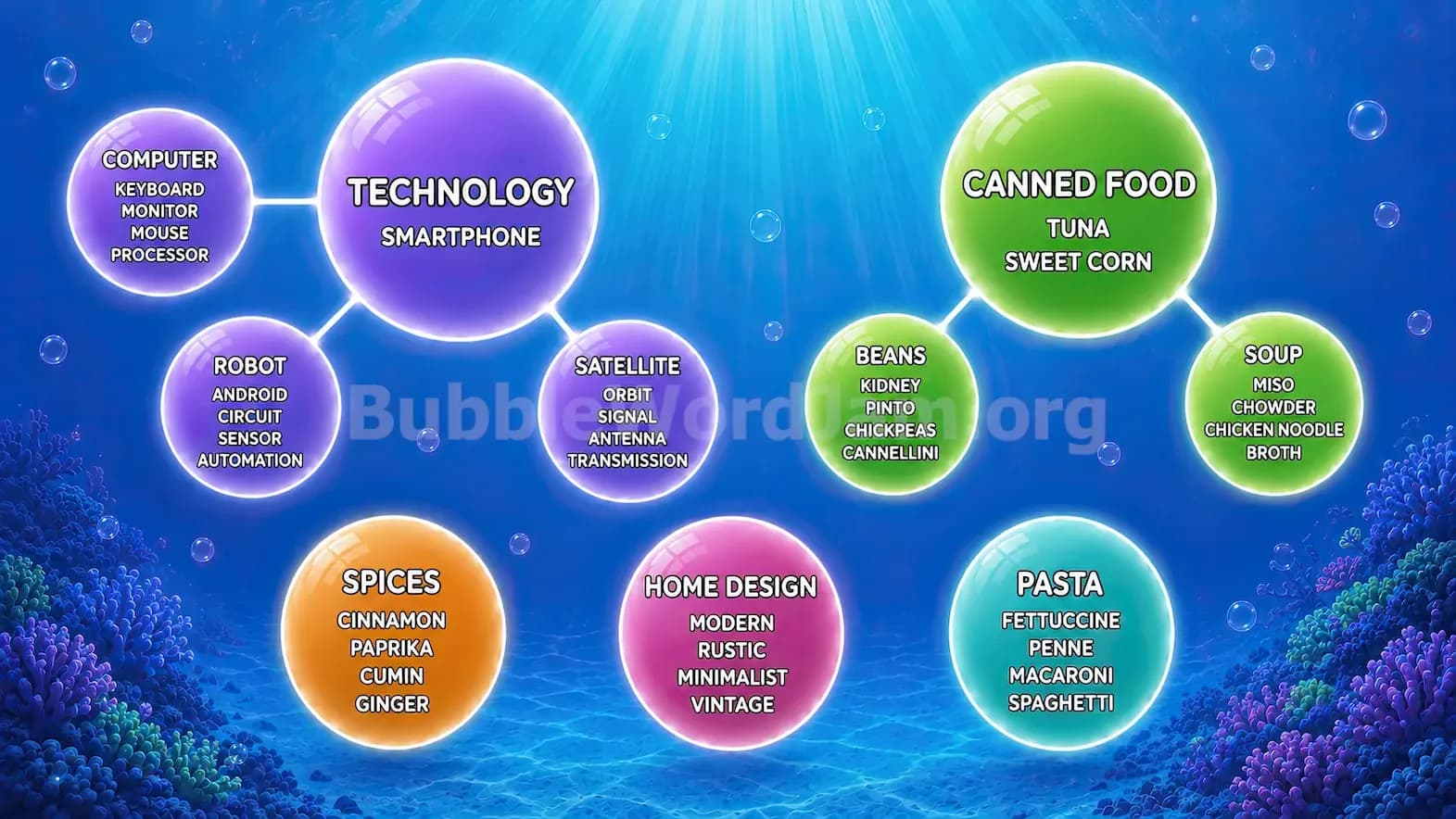
Level 43 uses the same logic with computer: keyboard, monitor, mouse, and processor. The game swaps CPU for processor, but the category vibe stays the same. That’s a rock-solid pattern to remember: if you see keyboard, monitor, mouse, CPU, or processor together, you’re probably looking at computer hardware.
Software categories are more slippery because they’re not physical. Level 74 is a great example. The programming language category uses Python, Java, Ruby, and Objective-C. These aren’t apps, brands, or devices. They’re languages used to write software.
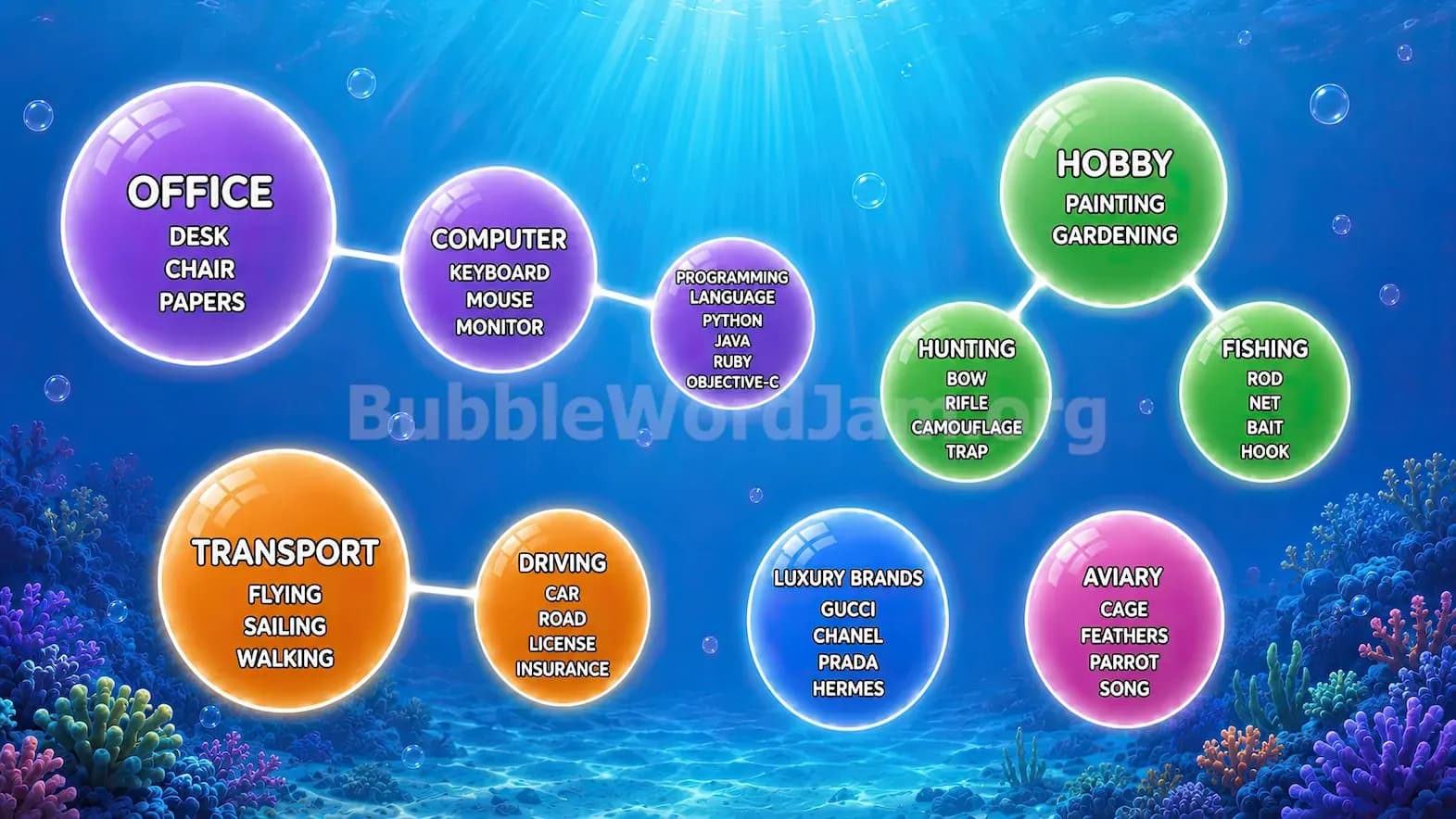
In the same level, the computer category includes Programming Language, keyboard, mouse, and monitor. That’s a slightly odd mix, and I can see players rolling their eyes at it. Still, the important lesson stands: Bubble Word Jam sometimes uses a broad “computer” category to absorb both a concept and physical pieces.
When you see Python or Java, resist the urge to pair them with animals, coffee, or geography. In a tech puzzle, they usually signal programming. If Swift, Ruby, Go, Pascal, or Objective-C show up, your brain should immediately switch into software mode.
A useful rule: programming clues are usually names, not actions. Software actions are verbs like save, delete, open, rename, copy, paste, sync, configure, or uninstall. Programming languages are labels. Keep those two groups separate.
Network clues are where Bubble Word Jam starts playing mind games. Level 277 is a banger example because it stacks several tech categories at once: digital file formats, communication tools, smartphone, internet, and radio.
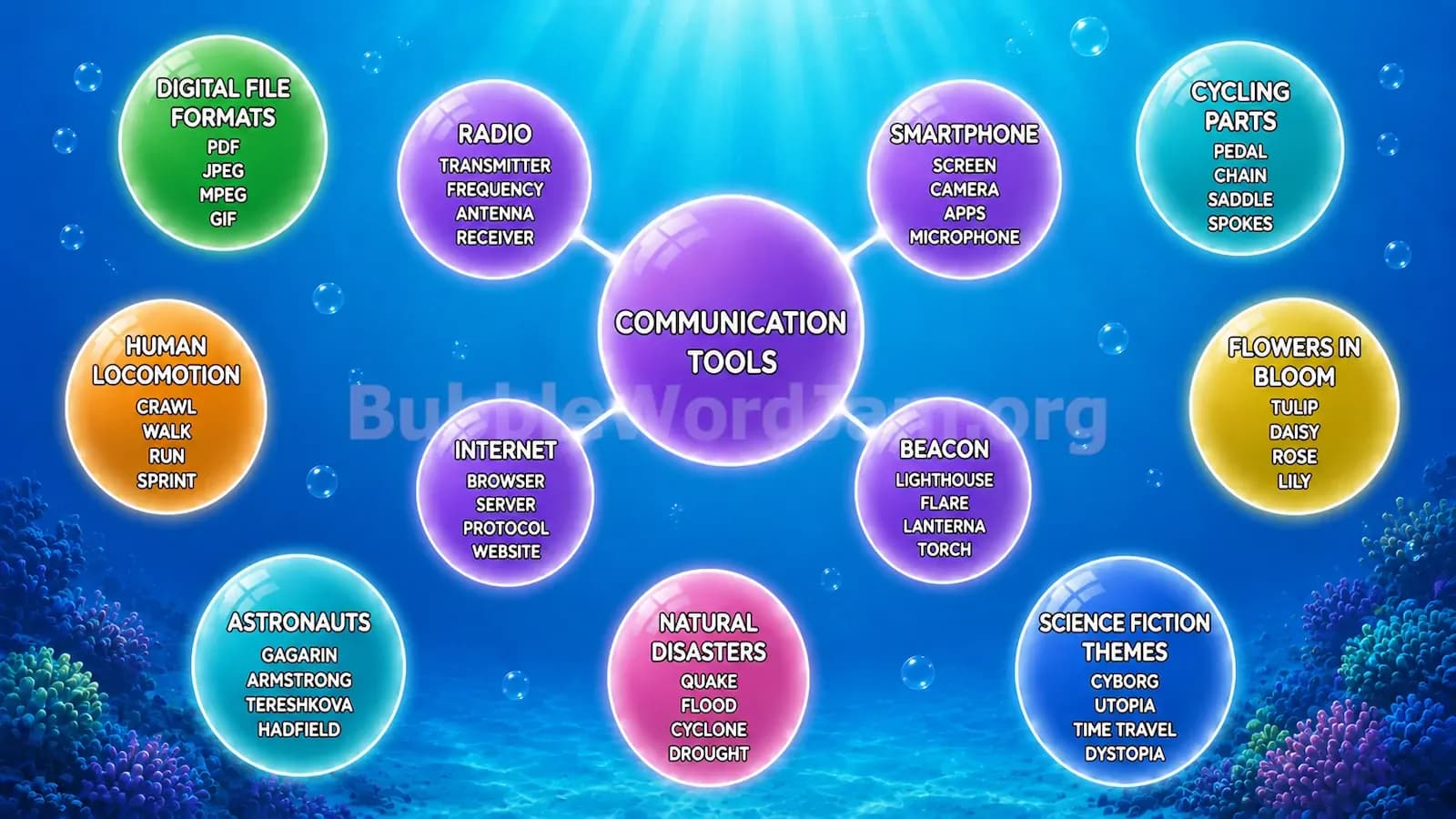
The internet category includes browser, server, protocol, and website. That’s not a gadget group. It’s a network-and-web group. A browser accesses the web. A server hosts or delivers information. A protocol defines communication rules. A website is what you visit. These clues all orbit the internet, not the device in your hand.
The smartphone category in Level 277 uses screen, camera, apps, and microphone. That’s a device-parts category. Even though apps can feel like software, here they belong to the phone ecosystem because they sit beside screen, camera, and microphone.
The radio category uses transmitter, frequency, antenna, and receiver. That’s another communication system, but it’s not the internet. If you see signal, antenna, transmitter, receiver, frequency, broadcast, or station, slow down. You may be in radio, satellite, or general communication territory.
Tech categories aren’t always machine parts. Sometimes they’re online behavior. Level 451 gives a clean social media platforms category: Facebook, Twitter, Instagram, and LinkedIn. That one is straightforward because every word is a named platform.
But the same level also includes computer input devices: mouse, keyboard, scanner, and webcam. This is where Bubble Word Jam tests whether you can avoid a category collision. Webcam could feel social because people use it online, but scanner and keyboard pull it into hardware. LinkedIn could feel like work or business, but Facebook, Twitter, and Instagram pull it into social platforms.
That’s the key: don’t judge one clue alone. Judge the group’s center of gravity. If the group contains named websites or apps used for posting and networking, think platform. If the group contains peripherals, think input devices.
Level 549 is especially useful because it separates file extensions from computer memory. Computer file extensions includes JPEG, DOC, PDF, and ZIP. Computer memory includes RAM, cache, ROM, and buffer.
This is a big deal. Many players see PDF and RAM and throw them into a generic “computer stuff” pile. That can tank your solve. File extensions tell you what kind of file something is. Memory terms describe how a computer stores, recalls, or temporarily holds information.
Here’s the clean split:
File clues often look like short labels after a dot: PDF, DOC, JPEG, PNG, GIF, ZIP, MP3, TXT, RTF, DOCX.
Memory clues often sound like storage or speed terms: RAM, ROM, cache, buffer, cloud, hard drive, server, database.
The game may blur storage and file types, but file extensions are usually more specific. If you see three or four tiny uppercase abbreviations, check whether they’re extensions before merging them with broader computer terms.
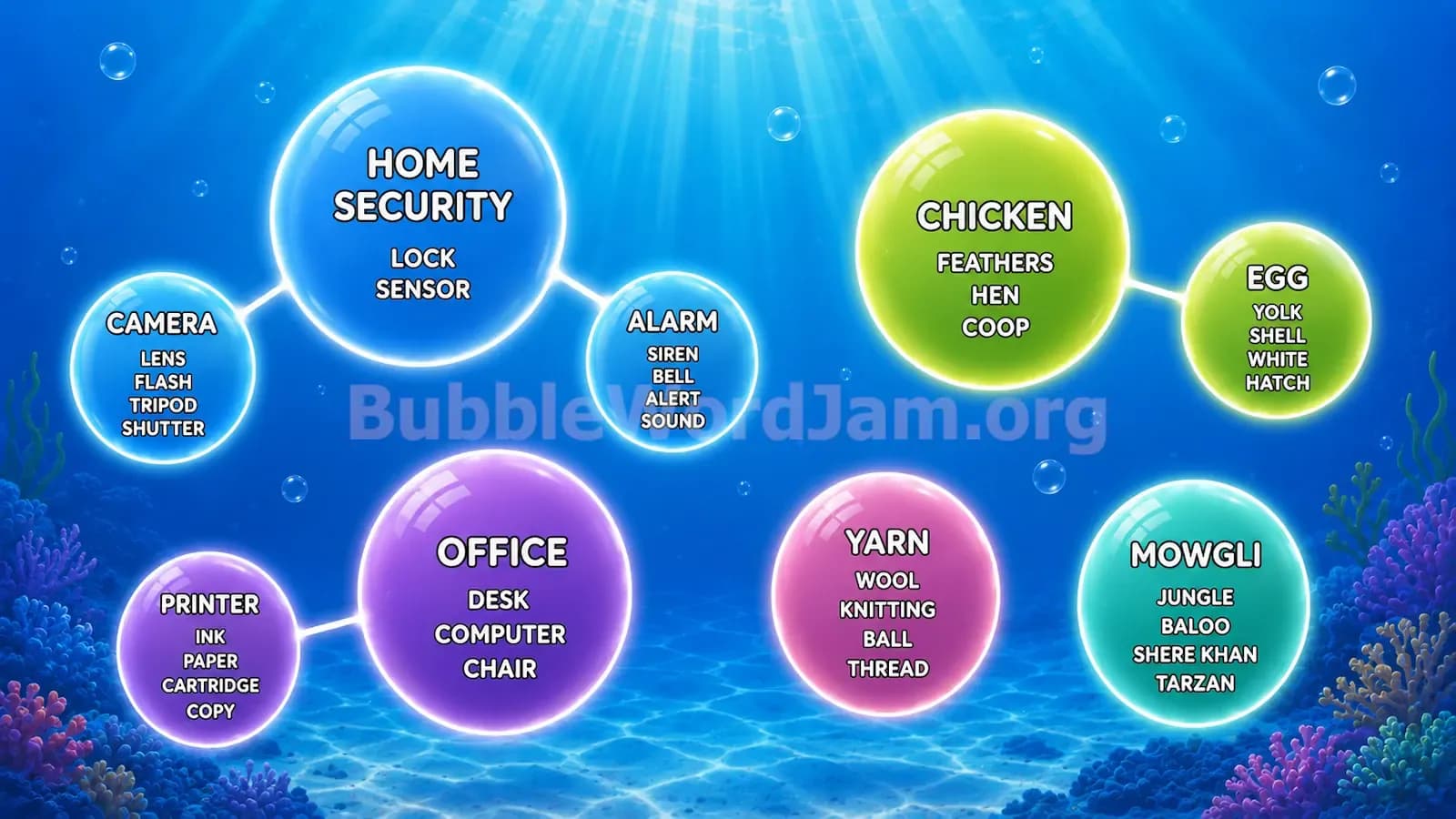
The most annoying tech clues are the ones that belong to multiple worlds. Camera is the obvious one. In Level 107, camera appears under home security beside alarm, lock, and sensor. But the same level also has a camera category with lens, flash, tripod, and shutter. Later, camera can show up as a smartphone part or photography clue.
So how do you decide? Look at its neighbors.
Camera + alarm + lock + sensor = home security.
Camera + lens + flash + tripod = photography gear.
Camera + screen + apps + microphone = smartphone.
Camera + outdoor camera + CCTV + motion sensor = security devices.
This is the Bubble Word Jam tech puzzle at its best. It’s not asking whether you know the word. It’s asking whether you understand context. That’s a much more satisfying loop when the categories click.
When I hit a tech-heavy Bubble Word Jam board, I use this order:
First, find the physical devices. Computer, smartphone, tablet, laptop, printer, router, webcam, scanner, monitor, and keyboard are usually hardware anchors.
Second, separate internal parts and peripherals. CPU, processor, RAM, cache, ROM, mouse, keyboard, screen, microphone, and cartridge often point to component-level categories.
Third, isolate software and file clues. Programming languages, file extensions, browser terms, commands, and software verbs usually need their own lane.
Fourth, identify online platforms and communication systems. Facebook, Instagram, Twitter, LinkedIn, browser, server, protocol, website, radio, antenna, transmitter, and receiver should not all go into one sloppy “internet” pile.
That last point matters. Bubble Word Jam loves broad technology themes, but the clean solve usually depends on narrow sorting. Hardware is not software. Software is not a platform. A platform is not the same as a network. A network is not always the internet.
Level 29 is a good warm-up for gadgets because computer, smartphone, tablet, and laptop form a clean device family.
Level 30 teaches the parent-child split between computer as a broad concept and hardware as physical parts.
Level 43 expands the field with computer, robot, satellite, and technology categories, making it perfect for practicing object versus system thinking.
Level 74 is the best early programming example because Python, Java, Ruby, and Objective-C clearly point to programming languages.
Level 107 is great for context traps because camera can belong to home security, photography gear, or office-related tech depending on the surrounding clues.
Level 277 is the standout tech gauntlet. It mixes digital file formats, communication tools, smartphone parts, internet terms, and radio systems in one busy board.
Level 451 sharpens the difference between social media platforms and computer input devices.
Level 549 is the cleanest practice level for file extensions versus computer memory.
Technology puzzles in Bubble Word Jam reward players who slow down for ten seconds and ask what type of tech they’re seeing. Is it a device? A part? A program? A file? A network term? A platform? That little pause can save you from wasting moves on a mediocre merge.
The strongest players don’t just recognize words. They recognize category architecture. Once you train that instinct, tech boards stop feeling like a messy junk drawer of gadgets and start feeling like a tidy desktop with every icon in the right folder.